> For the complete documentation index, see [llms.txt](https://docs.revrobotics.com/llms.txt). Markdown versions of documentation pages are available by appending `.md` to page URLs; this page is available as [Markdown](https://docs.revrobotics.com/first-global/2026/sb-code/programming-intake-and-flywheel.md).
# Programming - Intake and Flywheel
## Intake
Bumper controls for the intake
The intake is controlled using the bumpers on the gamepad. The **left bumper** intakes game pieces into the robot while **right bumper** reverses to output back onto the field.
## Flywheels and Feeder
The flywheel on the Starter Bot is controlled using two motors. These motors need to move at the same time when activated.
Flywheel and feeder code
When **cross** is pressed, the flywheels will both spin up to the set target velocity. Then the Core Hex controlling the feeder will wait until both motors are within 100 ticks of the target velocity before activating and feeding game pieces into the flywheel to launch.
#### Manual Feeder Control
Manual feeder controls
The Core Hex motor controlling the feeder into the flywheel can be manually controlled using the Dpad on the gamepad to assist with agitating game pieces and clearing jams.
#### Stopping the Motors
Resetting motors to 0 power
If the robot is not receiving input from the Dpad or Cross button, then all three motors will return to 0 power.
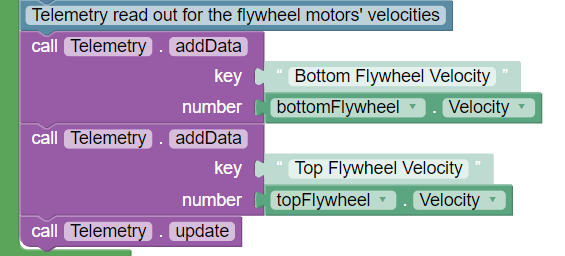
### Flywheel Telemetry
To aid with fine tuning the flywheels, we can add telemetry to see the current velocity on the Driver Hub. The velocity can be changed by modifying the `targetVelocity` variable.