> For the complete documentation index, see [llms.txt](https://docs.revrobotics.com/llms.txt). Markdown versions of documentation pages are available by appending `.md` to page URLs; this page is available as [Markdown](https://docs.revrobotics.com/ftc-kickoff-concepts/home/programming-teleop-and-auto/programming-overview.md).

# Programming - Overview

## Initialization&#x20;

During initialization, after "Init" is pressed on the Driver Hub but BEFORE "Play" is pressed, there are a few things we can set up for our code.&#x20;

<figure><img src="https://268621232-files.gitbook.io/~/files/v0/b/gitbook-x-prod.appspot.com/o/spaces%2F-MHCAE012xNfg1h3SM9v%2Fuploads%2FvV9Yrl2ZMEDaYPi7R6He%2Fimage.png?alt=media&amp;token=b7de69c3-26ca-47da-8313-db64bff8846d" alt=""><figcaption><p>The initialization portion of the Starter Bot code</p></figcaption></figure>

First are our motor settings. One of the drivetrain motors must be reversed to prevent spinning in a circle. For the 2026-27 Starter Bot, the rightDrive motor is reversed. Then our flywheel need to be set to use the encoder since we will be using velocity.&#x20;

Then we will set up our variables. There is only one variable in the default code, `targetVelocity`, which sets the velocity the flywheel will try to reach for launching pollen from near the field perimeter. If your team decides to change where you want to launch from, this variable can be updated here or an additional one can be added!

## OpMode Overview

After play is pressed, the looping portion of the OpMode will begin. But first, the pollenServo will be set itself to the up position (1). This helps to ensure the extension is out of the way as the robot drives until the servo is activated.&#x20;

<figure><img src="https://268621232-files.gitbook.io/~/files/v0/b/gitbook-x-prod.appspot.com/o/spaces%2F-MHCAE012xNfg1h3SM9v%2Fuploads%2FPODPtkVAXyhm7Yhnw6Yn%2Fimage.png?alt=media&amp;token=0fd7e411-7045-4f10-b789-8eb2e17404c7" alt=""><figcaption></figcaption></figure>

### Main Loop

The loop for the OpMode may appear pretty short, but this is thanks to the use of functions[^1]! Each of the main systems have been separated into their own functions for easy viewing and adjustments to the program.

<figure><img src="https://268621232-files.gitbook.io/~/files/v0/b/gitbook-x-prod.appspot.com/o/spaces%2F-MHCAE012xNfg1h3SM9v%2Fuploads%2F8ol6vULNMjkfDzbCSn9J%2Fimage.png?alt=media&amp;token=8b120ed4-eb91-44b2-b42b-4521e1e6e14d" alt=""><figcaption></figcaption></figure>

#### Functions

<table><thead><tr><th width="285">Function Name</th><th>Description</th></tr></thead><tbody><tr><td>intakeControls</td><td>This is the code used to control the Core Hex intake for the pollen.</td></tr><tr><td>pollenPoker</td><td>This is the code used to control the servo's position for poking pollen out of a flower</td></tr><tr><td>arcadeDrive</td><td>This is the code for driving the robot. Look here if you plan to change to Split Arcade, Mecanum, or Tank Drive</td></tr><tr><td>flywheelControls</td><td>This larger function contains the code for the flywheel system, including both manual controls and the auto sequence for launching pollen.</td></tr></tbody></table>

{% hint style="info" %}
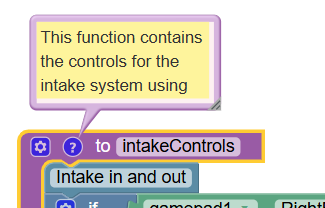
Within the program, clicking the "?" on a function will reveal information on that functions purpose.

<img src="https://268621232-files.gitbook.io/~/files/v0/b/gitbook-x-prod.appspot.com/o/spaces%2F-MHCAE012xNfg1h3SM9v%2Fuploads%2FNVkIqYV6BgkYLE4qCsGa%2Fimage.png?alt=media&amp;token=af76d202-bd83-46a6-8481-c9a57d7b0b8b" alt="" data-size="original">
{% endhint %}

#### Telemetry

Telemetry allows us to receive information on the Driver Hub from the robot. The telemetry included provides a readout of the current velocity for the flywheel to help with troubleshooting and making adjustments to the code.

<figure><img src="https://268621232-files.gitbook.io/~/files/v0/b/gitbook-x-prod.appspot.com/o/spaces%2F-MHCAE012xNfg1h3SM9v%2Fuploads%2FXp7STw1OJuV3qCnxKa2u%2Fimage.png?alt=media&amp;token=e9e4ce1d-da46-49cf-b1b4-7f9c2cb3407b" alt=""><figcaption></figcaption></figure>

[^1]: Functions contain multiple lines of pre-written code or instruction, but are represented by one word