arrow-left

All pages
gitbookPowered by GitBook
1 of 5

Loading...

Loading...

Loading...

Loading...

Loading...

Power and Motor Connections

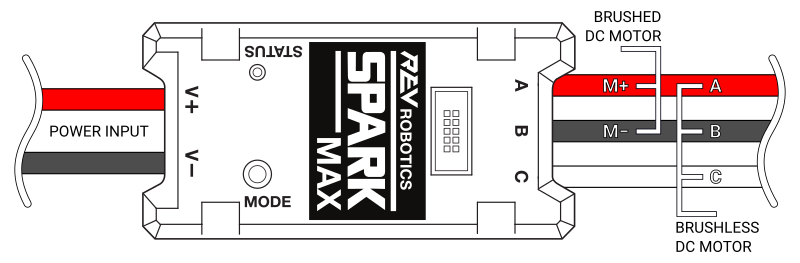
SPARK MAX is designed to drive 12V brushed and brushless DC motors at currents up to 60A continuously. Power and motor connections are made through the two sets of wires built into the SPARK MAX. The wires are 12AWG ultra-flexible silicone-coated wire. Each wire runs approximately 15cm from the end faces of the controller. Be sure to take care when cutting and stripping the wires as not to cut them too short. The figure below shows these connections in detail.

SPARK MAX Motor Controller Power Connections
circle-exclamation

As with any electrical component, make all connections with the power turned off. Connecting the SPARK MAX to a powered system may result in unexpected behavior an may pose a safety risk.

hashtag
Motor Output

Motor output wires are labeled as A, B, and C with red, black, and white wires. Brushed motors must be connected to the A and B wires, while brushless motors must be connected to all three. It is critical that the order of the brushless motor wires match the SPARK MAX or the motor will not spin and could be damaged. Additional details are below.

hashtag
Motor Connections

SPARK MAX cannot detect which motor type it is connected to. Be sure to configure the SPARK MAX to run the type of motor you have connected. See the section for more details on configuring the appropriate motor type.

hashtag
Power Input

Power input wires are labeled as V+ and V- with red and black wires. The SPARK MAX is intended to operate in a 12 V DC robot system, however, it is compatible with any DC power source between 5.5 V and 24 V.

triangle-exclamation

DO NOT reverse V+ and V- or swap motor and power connections. Doing so will cause permanent damage to the SPARK MAX and will void the warranty.

triangle-exclamation

DO NOT exceed the maximum supply voltage of 30V. Doing so will cause permanent damage to the SPARK MAX and will void the warranty.

When using high-current motors, it is recommended to use a power source that is capable of handling large surge currents, e.g. a 12V lead-acid battery. If the supply voltage drops below 5.5V the SPARK MAX will brown out, resulting in unexpected behavior. It is also highly recommended to incorporate a fuse or circuit breaker in series with the SPARK MAX between it and the power source to prevent exceeding the maximum current rating.

triangle-exclamation

DO NOT exceed the maximum current ratings:

  • 60A for 3 minutes

100A for 2 seconds

Doing so will cause permanent damage to the SPARK Flex and will void the warranty.

Motor Type - Brushed/Brushless Mode

Encoder Port

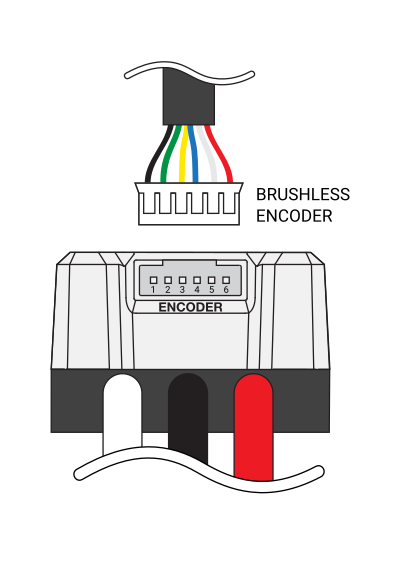
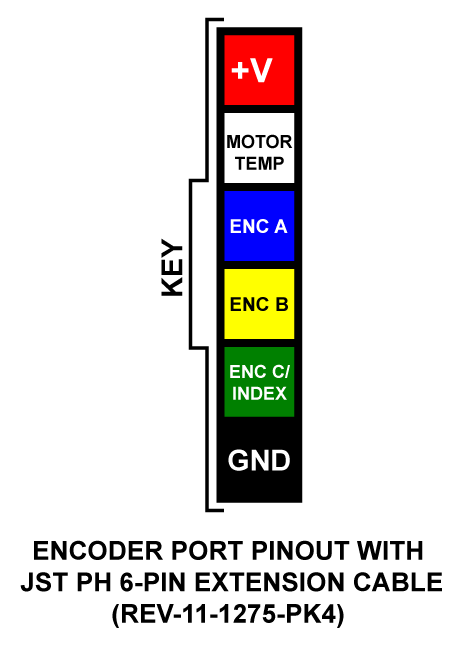
Located on the motor output side of the SPARK MAX is a 6-pin Encoder Port. This port is designed to accept the built-in hall-encoder from the NEO Brushless Motorarrow-up-right, but it can also connect to other external encoders when running in Brushed Mode. The connector details can be found below.

circle-info

The SPARK MAX can be configured to run in Alternate Encoder Mode, which reconfigures the Data Port on the top of the controller to accept an alternative quadrature encoder in addition to the Encoder Port.

hashtag
Encoder Port Connector Information

hashtag
Mating Connector Information

Description
Manufacturer
Part Number
Vendor
Vendor P/N

Encoder A

5

Analog

Motor Temperature

6

Power

+5V

Recommended Crimping Tool

IWISS

SN-2549

Amazon

Connector Pin

Pin Type

Pin Function

1

Power

Ground

2

Digital

Encoder C / Index

3

Digital

Encoder B

4

JST-PH 6-pin Housing

JST

PHR-6

DigiKey

455-1162-NDarrow-up-right

JST-PH Contact

JST

SPH-002T-P0.5L

Digital

DigiKey

455-2148-1-NDarrow-up-right
SN-2549arrow-up-right

Data Port

hashtag
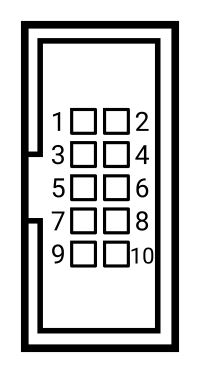
SPARK MAX Data Port Pinout

Located on the top of the SPARK MAX, the Data Port allows for extra sensor input and future feature development. The connector details can be found below.

Connector Pin

Pin Type

Using the () makes interfacing with the SPARK MAX Data Port easier.

hashtag
SPARK MAX Data Port Features

hashtag
Limit Switch Inputs

SPARK MAX has two limit switch inputs that, when triggered, can independently prevent motion in both the forward and reverse directions. By default, when the pin for the corresponding direction is grounded, SPARK MAX will override any input commands for that direction and force the output into the neutral state. Input commands for the opposite direction will still be processed unless the corresponding limit signal is also triggered.

The default polarity is compatible with Normally Open (NO) style limit switches, whose contacts are shorted together when the switch is pressed. The Limit Switch Inputs can be configured for the opposite polarity using the USB or CAN interfaces. When configured for the opposite polarity, Normally Closed (NC), the limit will be triggered when the pin is left disconnected from ground. In other words, connecting the pin to ground will release the limit. The following table shows these configurations in detail:

hashtag
Limit Switch Operation

hashtag
Quadrature Encoder Input

The Quadrature Encoder Input on the Data Port is compatible with standard quadrature encoder signals, usually labeled as channel A, channel B, and Index. SPARK MAX shares these signals with the Encoder Port on the output side of the controller, therefore the Index signal is shared with the third brushless encoder signal C. When in Brushless Mode, these Data Port pins cannot be used with an external encoder. See for information on how to configure the SPARK MAX to accept an alternative encoder source when running in Brushless Mode.

When in Brushed Mode, an external encoder can be connected through either the Data Port or the Encoder Port.

The SPARK MAX encoder signals are not pulled high internally. This is to ensure the maximum compatibility with different types of encoders.

hashtag
Analog Input

The Analog Port on the SPARK MAX can measure voltages up to 3.3V with 12-bit resolution. The SPARK MAX Data Port Breakout includes a 5V to 3.3V amplifier circuit so that 5V signals can be sensed with the Analog Input pin.

Analog input is supported on firmware versions 1.4.0 and newer.

hashtag
Multi-function Pin

This pin is reconfigured when the SPARK MAX is configured in Alternate Encoder Mode.

hashtag
Power Rails

The SPARK MAX Data Port can provide both 3.3V and 5V power to connected devices. Please check for details on the supply current capabilities of both rails.

hashtag
SPARK MAX Data Port Accessories

hashtag
Alternate Encoder Adapter

hashtag
Features

The SPARK MAX Alternate Encoder Adapter () enables the use of an alternative encoder source different from the default. This is especially useful when running one of the NEO Brushless Motors, as the default encoder port is occupied by the built-in NEO hall sensors. Please see the Alternate Encoder Mode section in the for more information.

  • JST PH 6-pin connector

  • Pinout compatible with REV Through Bore Encoder

  • Index Signal/Absolute PWM Pulse selection switch

hashtag
Specifications

  • 1 x JST PH, 6-pin connector

  • 1 x 14 Position 2 Row Receptacle Connector 0.050"

hashtag
Absolute Encoder Adapter

hashtag
Features

The SPARK MAX Absolute Encoder Adapter () connects the Absolute Duty Cycle output of the Through Bore Encoder to the correct SPARK MAX Data Port pins, leaving the incremental quadrature pins disconnected.

  • JST PH 6-pin connector

  • Pinout Compatible with REV Through Bore Encoder

  • Solder pads

  • Limit Switches

hashtag
Specifications

  • 1 x JST PH, 6-pin connector

  • 1 x 14 Position 2 Row Receptacle Connector 0.050"

hashtag
Data Port Breakout Board

hashtag
Features

The SPARK MAX Data Port Breakout Board () makes it easy to connect external sensors to the SPARK MAX Data Port.

  • Solder pads for every Data Port pin

  • Analog input 5V to 3.3V converter

    • Built-in amplifier maps 0V - 5V analog signals to the native 0V - 3.3V range of the SPARK MAX Analog Input

Control Connections

The SPARK MAX can be controlled by three different interfaces, servo-style PWM, controller area network (CAN), and USB. The following sections describe the physical connections to these interfaces in detail. For details on the operation and protocols of the PWM, CAN, and USB interfaces, please see the section on Control Interfaces.

hashtag
CAN/PWM Port

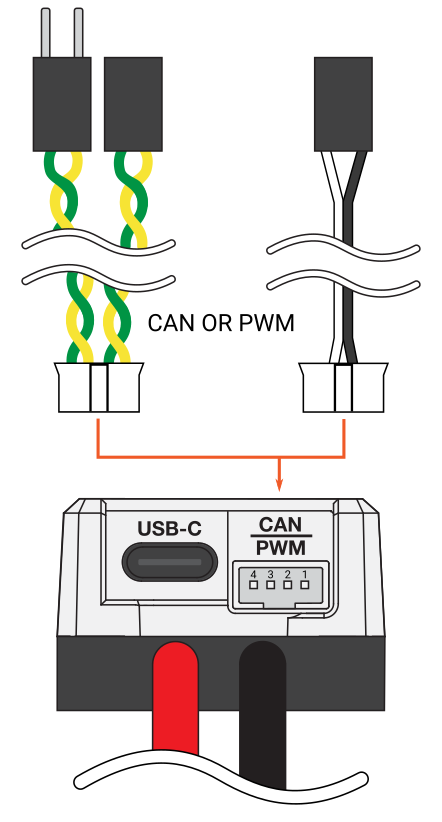
The CAN/PWM Port is located on the power input side of the SPARK MAX. This port can be connected to either a servo-style PWM signal or a CAN bus with other devices. Connector details can be found below.

hashtag
CAN/PWM Port Connector Information

hashtag
Mating Connector Information

Identical-function pins are electrically connected inside the SPARK MAX, therefore the CAN daisy-chain is completed internally and any two signal and ground pairs can be used for PWM.

hashtag
USB-C Port

The USB-C Port is located on the power input side of the SPARK MAX. It supports USB 2.0 and 5V power for the SPARK MAX's internal microcontroller. While you can configure the SPARK MAX without main power, you will not be able to spin a motor.

Selects which signal is connected to pin 4 of the Data Port
  • Solder pads

  • Analog Input

  • 3.3V and 5.0V Power

  • Ground

  • Ground

  • Configurable resistors can bypass the amplifier (move R3 to R4 position)

  • Pass-through Data Port connector

    • Connect other sensors with data port-compatible cables while using this breakout

  • Mounts directly to SPARK MAX

    • No need for a data port cable

    • Securely mounts to the SPARK MAX zip-tie notches

  • Pin Function

    1

    Power

    +3.3V

    2

    Power

    +5V

    3

    Analog

    Analog Input

    4

    Digital

    Forward Limit Switch Input

    5

    Digital

    Encoder B

    6

    Digital

    Multi-function Pin

    7

    Digital

    Encoder A

    8

    Digital

    Reverse Limit Switch Input

    9

    Digital

    Encoder C / Index

    10

    Ground

    Ground

    SPARK MAX Data Port Breakout Board
    REV-11-1278arrow-up-right
    Alternate Encoder Mode
    Data Port Specifications
    REV-11-1881-PK2arrow-up-right
    SPARK MAX User's Manual
    REV-11-3326arrow-up-right
    REV-11-1278arrow-up-right

    Ground

    Recommended Crimping Tool

    IWISS

    SN-2549

    Amazon

    Connector Pin

    CAN Function

    PWM Function

    1

    CAN High

    Signal

    2

    CAN Low

    Ground

    3

    CAN High

    Signal

    4

    Description

    Manufacturer

    Part Number

    Vendor

    Vendor P/N

    JST-PH 4-pin Housing

    JST

    PHR-4

    DigiKey

    455-1164-NDarrow-up-right

    JST-PH Contact

    JST

    SPH-002T-P0.5L

    DigiKey

    CAN Low

    SPARK MAX Specifications

    The following tables provide the operating and mechanical specifications for the SPARK MAX Motor Controller.

    triangle-exclamation

    DO NOT exceed the maximum electrical specifications. Doing so will cause permanent damage to the SPARK MAX and will void the warranty.

    hashtag

    Main Electrical Specifications
    Parameter
    Min
    Typ
    Max
    Units

    Operating Voltage Range

    5.5

    12

    24

    V

    Absolute Maximum Supply Voltage

    -

    -

    circle-exclamation

    *Continuous operation at 60A may produce high temperatures on the heat sink. Caution should be taken when handling the SPARK MAX if it has been running at higher current level for an extended period of time.

    circle-exclamation

    If using a battery to power SPARK MAX, make sure the fully charged voltage is below 24V allowing for sustained operation. Some battery chemistries and configurations, including 6S LiPo packs, have a charge voltage above the maximum operating voltage for SPARK MAX.

    hashtag
    PWM Input Specifications

    Parameter
    Min
    Typ
    Max
    Units

    Full-reverse Input Pulse †

    -

    1000

    -

    μs

    Neutral Input Pulse ††

    -

    1500

    †

    Brushed: between A and B outputs at 100% duty. Brushless: A->B->C direction at 100% duty.

    ††

    Neutral corresponds to zero output voltage (0 V) and is either braking or coasting depending on the current idle behavior mode.

    †††

    Brushed: between A and B outputs at 100% duty.

    Brushless: C->B->A direction at 100% duty.

    ‡

    If a valid pulse isn't received within the timeout period, the SPARK MAX will disable its output.

    ‡‡

    Input deadband is added to each side of the neutral pulse width. Within the deadband, output state is neutral. The deadband value is configurable using the REV Hardware Client or through the CAN interface.

    hashtag
    Data Port Specifications

    Parameter

    Min

    Typ

    Max

    Units

    Digital input voltage range †

    0

    -

    5

    V

    Digital input-high voltage †

    1.85

    -

    -

    †

    See the documentation for more details on the digital pins on the Data Port.

    ††

    See the documentation for more details on the Data Port's analog pin.

    ‡

    The 5V supply is shared between the Data Port and Encoder Port.

    hashtag
    Encoder Port Specifications

    Parameter

    Min

    Typ

    Max

    Units

    Digital input voltage range †

    0

    -

    5

    V

    Digital input-high voltage †

    1.85

    -

    -

    †

    See the documentation for more details on the digital pins on the Data Port.

    ††

    See the documentation for more details on the Data Port's analog pin.

    ‡

    The 5V supply is shared between the Data Port and Encoder Port.

    hashtag
    Mechanical Specifications

    Parameter

    Min

    Typ

    Max

    Units

    Body length

    -

    70

    -

    mm

    Body width

    -

    35

    -

    455-2148-1-NDarrow-up-right
    SN-2549arrow-up-right

    30

    V

    Continuous Output Current

    -

    -

    60*

    A

    Maximum Output Current (2 second surge)

    -

    -

    100

    A

    Output Frequency

    -

    20

    -

    kHz

    -

    μs

    Full-forward Input Pulse †††

    -

    2000

    -

    μs

    Valid Input Pulse Range

    500

    -

    2500

    μs

    Input Frequency

    50

    -

    200

    Hz

    Input Timeout ‡

    -

    50

    -

    ms

    Default Input Deadband ‡‡

    -

    5

    -

    %

    Input High Level

    0.5

    0.7

    0.9

    V

    Input Voltage Max

    12

    -

    -

    V

    V

    Digital input-low voltage †

    -

    -

    1.36

    V

    Analog input voltage range ††

    0

    -

    3.3

    V

    Analog input (12bit)

    -

    81

    -

    μV

    5V supply current (I5V) ‡

    -

    -

    100

    mA

    3.3V supply current (I3.3V)

    -

    -

    30

    mA

    Total supply current (I5V + I3.3V)

    -

    -

    100

    mA

    V

    Digital input-low voltage †

    -

    -

    1.36

    V

    Analog input voltage range ††

    0

    -

    3.3

    V

    5V supply current (I5V) ‡

    -

    -

    100

    mA

    3.3V supply current (I3.3V)

    -

    -

    30

    mA

    Total supply current (I5V + I3.3V)

    -

    -

    100

    mA

    mm

    Body height

    -

    25.5

    -

    mm

    Weight

    -

    113.3

    -

    g

    Power and motor wire gauge

    -

    12

    -

    AWG

    Power and motor wire length

    -

    15

    -

    cm

    Data Port
    Analog Input
    Data Port
    Analog Input
    Encoder Port Pinout shown with color coding for JST PH 6-Pin Cables (REV-11-1275). Pin 1 is Black and for Ground. Pin 2 is Green and for Encoder C or Index. Pin 3 is Yellow and for Encoder B. Pin 4 is Blue and for Encoder A. Pin 5 is White and for Motor Temperature. Pin 6 is Red and for 5 Volt Power.