# Programming - Initialization

{% hint style="info" %}
This walkthrough is for the example program that DOES NOT include autonomous. For the [autonomous program click here!](https://docs.revrobotics.com/ftc-kickoff-concepts/decode-2025-26/programming-teleop/programming-autonomous-initialization)
{% endhint %}

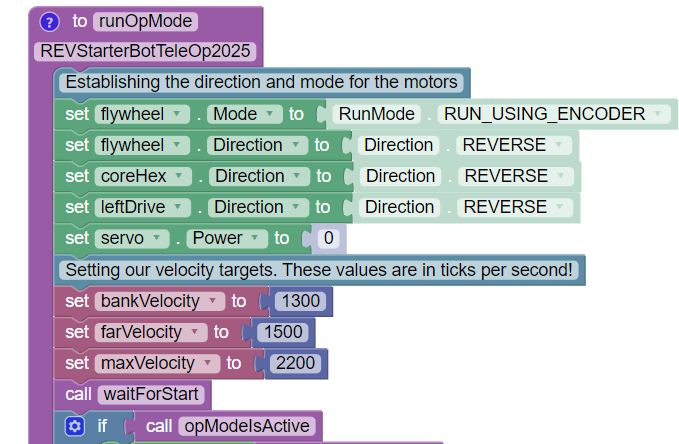
Before the bulk of our program begins, we need to first establish our variables and tell our motors how we want them to run. This section of code will run once when the program is activated and before we hit "Play" on the Driver Hub.

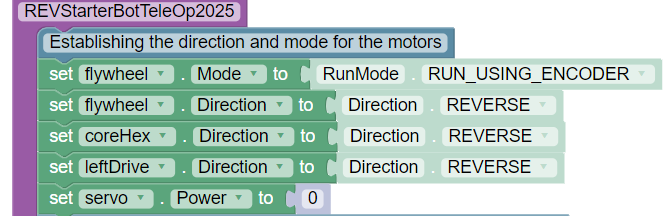
<figure><img src="https://268621232-files.gitbook.io/~/files/v0/b/gitbook-x-prod.appspot.com/o/spaces%2F-MHCAE012xNfg1h3SM9v%2Fuploads%2FMiLEm0lc48Nr3ehw1S6x%2Fimage.png?alt=media&#x26;token=9cf36daf-029e-4afc-bce3-e6aa232f9c84" alt=""><figcaption><p>Initialization Code</p></figcaption></figure>

## Motor and Servo Settings

Since we are going to be using velocity control for our flywheel, we need to set it up to run with encoders enabled. It has also been set to be reversed due to the direction it rests on our robot. Our Core Hex being used for the feeder is reversed for a similar reason.

Meanwhile the motors on our drivetrain are a mirror of each other, therefore one needs to be set to run in reverse. In this case, we have the leftDrive motor set to run in reverse.

Lastly, our servo is set to no power. Though it's not being used quite yet this helps to make sure it's properly enabled for when it's later called. You may hear it twitch slightly when initializing the program!

<figure><img src="https://268621232-files.gitbook.io/~/files/v0/b/gitbook-x-prod.appspot.com/o/spaces%2F-MHCAE012xNfg1h3SM9v%2Fuploads%2FK4lGJRfFL3d8cW7uLnzM%2Fimage.png?alt=media&#x26;token=722cbb68-d235-4e92-a7ea-0520a2222e3c" alt=""><figcaption></figcaption></figure>

## Initializing Variables

{% hint style="info" %}
[To learn more about "What is a Variable?" check out our Hello Robot tutorial!](https://docs.revrobotics.com/duo-control/hello-robot-blocks/part-2/arcade-style-teleop-blocks/establishing-variables-in-blocks#what-is-a-variable)
{% endhint %}

<figure><img src="https://268621232-files.gitbook.io/~/files/v0/b/gitbook-x-prod.appspot.com/o/spaces%2F-MHCAE012xNfg1h3SM9v%2Fuploads%2FDc2p67kuTjZUCAEPn70K%2Fimage.png?alt=media&#x26;token=19849de9-265d-4936-b122-192beee71a27" alt=""><figcaption></figcaption></figure>

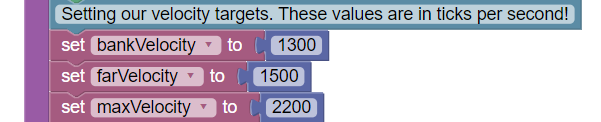
The three variables used in our program this year are used to set targets for what velocity our flywheel needs to reach. If at any time the target velocity needs to be adjusted it only has to be updated here to reflect through the whole code!&#x20;

<table><thead><tr><th width="215.1112060546875">Variable</th><th>Purpose</th></tr></thead><tbody><tr><td>bankVelocity</td><td>The flywheel velocity target for launching balls while against, or close to the goal</td></tr><tr><td>farVelocity</td><td>The flywheel velocity target for launching balls from a few feet back from the goal</td></tr><tr><td>maxVelocity</td><td>The "max" velocity for the flywheel. This can be increased, but is not recommended</td></tr></tbody></table>

Variations in your robot build may require these values to be changed. For example, adjusting the deflector may allow the robot to do far shots from further away.&#x20;

We encourage experimenting with different velocities to determine what works best for your team and robot!


---

# Agent Instructions: Querying This Documentation

If you need additional information that is not directly available in this page, you can query the documentation dynamically by asking a question.

Perform an HTTP GET request on the current page URL with the `ask` query parameter:

```
GET https://docs.revrobotics.com/ftc-kickoff-concepts/decode-2025-26/programming-teleop/programming-initialization.md?ask=<question>
```

The question should be specific, self-contained, and written in natural language.
The response will contain a direct answer to the question and relevant excerpts and sources from the documentation.

Use this mechanism when the answer is not explicitly present in the current page, you need clarification or additional context, or you want to retrieve related documentation sections.