> For the complete documentation index, see [llms.txt](https://docs.revrobotics.com/llms.txt). Markdown versions of documentation pages are available by appending `.md` to page URLs; this page is available as [Markdown](https://docs.revrobotics.com/rev-crossover-products/blinkin/specs.md).
# Blinkin Specifications
## Electrical Specifications
| **Parameter** | **Min** | **Typ** | **Max** |
| ------------------------------- | ------- | --------------------------- | ------- |
| Recommended Operating Voltage † | 5.5V | 12V | 13.5V |
| Absolute Input Voltage †† | 5.2V | - | 25V |
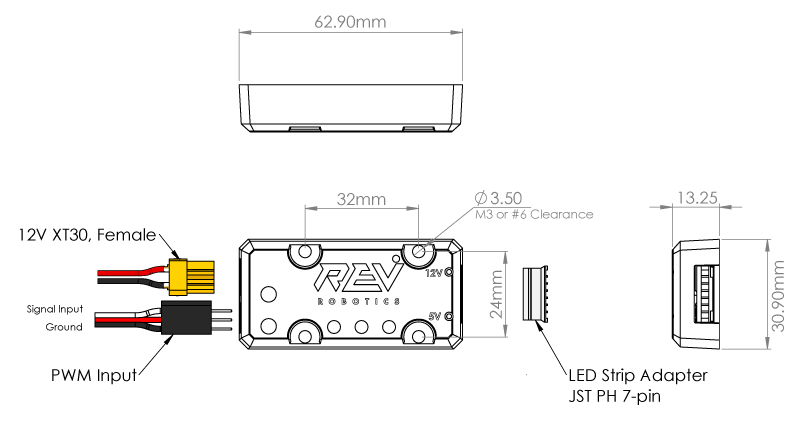
| Power Input | - | XT30 Connector, Male | - |
| PWM Input | - | 3-pin 0.1in pitch connector | - |
| LED Strip Adapter | - | 7-pin JST PH connector | - |
| 12V LED Output Current ‡ | - | - | 12A |
| 5V LED Output Current ‡‡ | - | - | 5A |
| † |
Minimum start-up operation for the 5V LEDs is 7V.
12V LEDs output is driven directly off this input voltage therefore lower or significantly higher input voltage may not allow for proper operation and may result in damage.
|
| -- | -------------------------------------------------------------------------------------------------------------------------------------------------------------------------------------------------------------------------------------------------- |
| †† | Recommended input operating voltage is from 5.5V to 13.5V. Absolute input voltage range is 5.2V- 25V—use caution before exceeding the recommended input range to prevent damage. |
| ‡ |
Maximum of 12A output. Supports a maximum of 300 LEDs in series, or up to two strings of 300 in parallel.
Equivalent to 10m of LEDs on 60 LED/m strips.
|
| ‡‡ |
Maximum of 5A output. Supports up to 240 LEDs for more patterns and brightness.
Equivalent to 4m of LEDs on 60LED/m strips.
|
## Supported LED Strip Types
The Blinkin can control either 12V RGB LEDs or 5V Addressable LED strips.
| **12V RGB LEDs** | These LEDs are all connected together so the strip will always be all the same solid color, but this kind of LED strip is generally cheaper than the 5V kind. Blinkin is designed for 12V Common Anode LEDs such as [REV-11-1197](http://www.revrobotics.com/rev-11-1197/). These strips have a four-wire interface and can be cut to length every three LEDs. |
| ----------------------- | -------------------------------------------------------------------------------------------------------------------------------------------------------------------------------------------------------------------------------------------------------------------------------------------------------------------------------------------------------------------------------------- |
| **5V Addressable LEDs** | Blinkin can control the WS2812 5V individually addressable LED type strips such as [REV-11-1198](http://www.revrobotics.com/rev-11-1198/). This kind of strip is more expensive than the 12V type, but each individual LED can be a different color and brightness to create very colorful animations. These strips have a 3-wire interface and can be cut to length between each LED. |
## Mechanical Drawing